

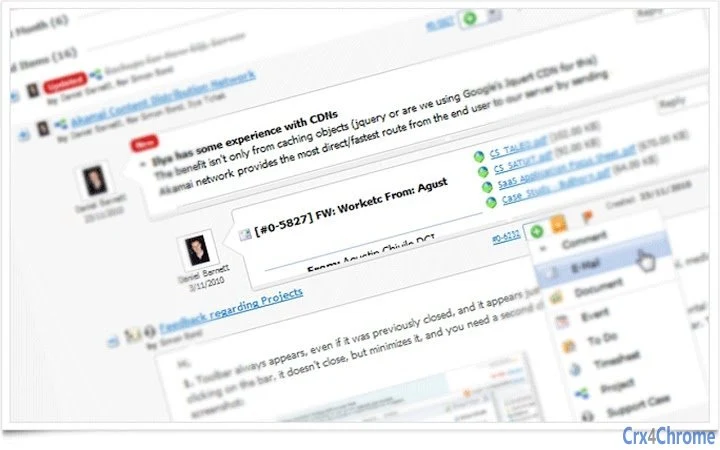
Description
Download WORKetc – CRM, Project Management, Sales, Help Desk
Overview
WORKetc is a comprehensive desktop and web-based business management platform designed to unify essential tools such as CRM, project management, billing, sales tracking, help desk operations, and document handling into a single integrated system. Built with productivity in mind, it enables users to streamline workflows by leveraging Gmail integration, real-time collaboration, and automation features. The software is particularly suited for small to mid-sized businesses, freelancers, consultants, and teams that rely heavily on email communication and need a centralized hub for managing client relationships and internal operations.
Its core purpose is to eliminate the need for multiple disconnected tools by offering a unified environment where customer data, project timelines, support tickets, and financial records are accessible in one place. This reduces manual data entry, minimizes errors, and improves team coordination. Real-world use cases include turning incoming emails into leads or support tickets, assigning tasks directly from Gmail, and tracking project progress with time sheets and billing updates—all without leaving the email interface.
WORKetc’s developer, WORKetc, emphasizes real-world application by using its own platform to manage internal operations, signaling a commitment to product reliability and usability. The software supports multiple languages, including Spanish, French, Italian, German, and Mandarin, making it accessible to international teams. While specific developer background details are not provided, the product’s design reflects a strong focus on operational efficiency and seamless integration with existing workflows.
Key Features & Capabilities
- Integrated CRM, Projects & Billing – Consolidates customer relationship management, project tracking, and financial invoicing into one platform, enabling users to view a complete history of client interactions, purchases, and project milestones.
- Gmail Widget Integration – Allows users to convert emails into leads, contacts, tasks, or support cases directly from Gmail, enhancing workflow efficiency and reducing response time.
- Two-Way Google Contacts Sync – Ensures that contact information remains consistent across Gmail and WORKetc, preventing data silos and maintaining up-to-date records.
- Document Management with Google Docs – Enables attachment of Google Docs to contacts, projects, leads, and support cases, facilitating collaborative editing and secure document sharing.
- Mobile Web, Android, and iPhone Apps – Provides access to core features on the go, allowing users to stay productive from any location.
- Real Customer Support – The company offers direct support and actively uses its own product, ensuring that support teams are familiar with real-world challenges and solutions.
- Advanced Customization with Custom Fields – Users can tailor fields to match specific business needs, improving data accuracy and reporting flexibility.
- Real-Time Reporting & Company-Wide Search – Delivers instant insights into business performance and enables quick retrieval of information across all modules.
These features are especially beneficial for teams that depend on Gmail as their primary communication channel. For example, a marketing agency can convert a client’s email inquiry into a new lead, assign it to a project, and attach relevant documents—all within seconds. Similarly, a support team can tag priority emails, create help desk tickets, and notify assigned members instantly, ensuring no request is overlooked.
User Interface, Workflow & Performance
WORKetc features a clean, intuitive user interface designed for efficiency and ease of navigation. The layout is modular, allowing users to access CRM, projects, billing, and support functions through clearly labeled menus and dashboard widgets. The integration with Gmail via a dedicated widget enhances usability by enabling actions directly within the email client, minimizing context switching.
Workflow efficiency is significantly improved through automation and contextual actions. For instance, users can right-click an email and convert it into a contact, task, or support ticket without leaving Gmail. The system supports real-time updates, meaning changes made by one team member are immediately visible to others, fostering transparency and accountability.
Performance details were not specified by the developer. However, given the software’s reliance on web-based components and integration with external platforms like Google Apps, general performance behavior depends on internet connectivity, browser efficiency, and device capabilities. The developer did not provide additional system requirements or resource usage metrics. Stability is expected to be consistent for users with reliable internet access and modern devices, though specific CPU or RAM behavior remains unconfirmed.
Compatibility & System Requirements
WORKetc is compatible with Windows, Mac, and Linux operating systems, offering broad accessibility across different computing environments. The software is available as a desktop application with a size of 500 MB, indicating a moderate installation footprint. It is designed to work seamlessly with modern web browsers and integrates directly with Google’s ecosystem, including Gmail and Google Docs.
Version 2024.08.14 was released on August 14, 2024, and includes updates to functionality, performance, and security. While the software supports mobile access via web browsers and dedicated apps for Android and iPhone, specific hardware requirements were not listed. Exact system requirements were not provided, and compatibility with older OS versions remains unspecified. Users are advised to ensure their devices meet general modern computing standards for running web applications and integrated tools.
Pros and Cons
Pros
- Unified platform combining CRM, projects, billing, and help desk
- Seamless Gmail integration with a smart widget for quick actions
- Two-way Google Contacts sync maintains data consistency
- Supports multiple languages for international teams
- Real customer support with internal product usage
- Mobile access via web and native apps
- Custom fields allow for business-specific data tracking
- Real-time reporting and company-wide search enhance decision-making
Cons
- Exact system requirements were not specified
- Performance data under various loads was not provided
- Resource usage (CPU/RAM) details are unavailable
- Offline functionality is not confirmed
- Integration depth with non-Google tools is unclear
FAQ Section
Is WORKetc compatible with Windows, Mac, and Linux?
Yes, WORKetc supports Windows, Mac, and Linux operating systems, ensuring broad accessibility across different desktop environments.
Is the software secure and safe to use?
WORKetc is designed with business-grade security practices. As a cloud-based platform with integration into Google’s ecosystem, it benefits from Google’s security infrastructure. However, specific security protocols or compliance certifications were not detailed in the provided information.
How often does WORKetc release updates?
WORKetc released version 2024.08.14 on August 14, 2024. The software is regularly updated to improve functionality, performance, and security, though the exact update frequency was not specified.
What type of license does WORKetc offer?
WORKetc is available for free. The pricing model does not include paid tiers in the provided details, making it accessible for individuals and small teams without cost.
Can I use WORKetc offline?
Offline usage was not confirmed. The software relies heavily on web connectivity and integration with Google services, suggesting that full functionality requires an active internet connection.
Final Thoughts + CTA
WORKetc stands out as a powerful, all-in-one business management solution that brings together CRM, project management, billing, sales, help desk, and document handling in a single, cohesive platform. Its deep integration with Gmail and Google Apps makes it especially valuable for teams that operate primarily through email, enabling them to convert messages into actionable tasks with minimal effort. The inclusion of real-time reporting, mobile access, and multilingual support further enhances its appeal for modern, distributed teams.
While detailed technical specifications and performance benchmarks were not provided, the software’s design emphasizes usability, automation, and integration—key factors for improving operational efficiency. The fact that the developer uses its own product indicates a strong commitment to quality and real-world functionality.
For professionals and teams seeking to reduce tool fragmentation, minimize manual work, and gain a holistic view of their business, WORKetc offers a compelling solution. It’s ideal for freelancers, consultants, agencies, and small to mid-sized enterprises that rely on Gmail and need a unified system to manage their workflows.
Download WORKetc now to experience a smarter, more connected way to run your business.
Guides & Tutorials for WORKetc CRM + Projects App for Chrome
How to install WORKetc CRM + Projects App for Chrome
- Click the Preview / Download button above.
- Once redirected, accept the terms and click Install.
- Wait for the WORKetc CRM + Projects App for Chrome download to finish on your device.
How to use WORKetc CRM + Projects App for Chrome
This software is primarily used for its core features described above. Open the app after installation to explore its capabilities.
User Reviews for WORKetc CRM + Projects App for Chrome 0
No reviews found





